ColaOS Invite Codes and Invite Links: Rules and Rewards Explained
Published: May 12, 2026 • Updated: August 26, 2026 • By ColaOS Fan Research Team
This article is based on a public announcement shared on the official ColaOS WeChat channel and the current invite page inside the ColaOS app. It is independent reporting, not official documentation.
ColaOS invitations can be redeemed in two ways: through an invite link, or by entering an invite code on the sign-up screen inside the app. Both point to the same inviter and the same rules. Friends who sign up get a 3-day Breeze plan trial (Breeze is the $10/month entry-level plan), and you earn plan days, reset cards, or a 5% top-up reward once they start using it. A working link and its code are below — use either one if you want to try.
If you are new to ColaOS, start with the full product breakdown.
How it works now
Users find their personal invite link — and the matching code — on the ColaOS invite page, then share either one with friends. According to the rules shown on the current invite page:
- A friend who signs up through your invite link, or who enters your invite code during sign-up, gets a 3-day Breeze plan trial.
- After the friend completes their first conversation, you also get rewarded: without a paid plan you earn 3 days of the Breeze plan per friend (stackable); with a paid plan you earn 1 reset card (valid for 30 days, up to 5 cards per month).
- Every top-up your friend makes within 30 days of sign-up earns you a 5% credit reward, with no upper limit.
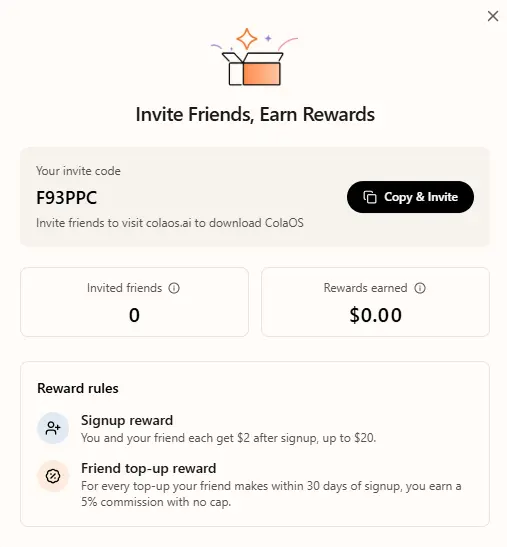
Invite link: https://colaos.ai/invite/F93PPC. Invite code: F93PPC. If you want to try ColaOS, register through the link or enter that code in the app. Either way you get a 3-day Breeze plan trial.
How to use an invite link or code
If you received an invite link or an invite code from a friend, a giveaway, or any other source, here is how to get started:
- Open the invite link — Register through the link and your account is bound to the inviter automatically. Prefer using an invite code? Skip ahead — you enter it on the sign-up screen at step 3.
- Download ColaOS — Get the installer for your platform. Windows users can follow the Windows installation guide. Mac users can download directly from the links below.
- Open ColaOS and sign up — After installation, launch the app and click Sign Up on the login screen. If you are using an invite code rather than a link, enter it there; codes are case-sensitive.
- Verify your email — Complete the email verification step to activate your account. Your 3-day Breeze plan trial starts once you are in.
Note:An invite code is simply the last segment of an invite link — F93PPC corresponds to colaos.ai/invite/F93PPC. A code from a giveaway works the same way: append it to that path, or enter it on the sign-up screen inside the app. Current reward conditions are shown on the product's own invite page.
Why invites instead of open registration
The team framed this as a natural step rather than a growth tactic. ColaOS is not the kind of product you understand from screenshots. The best introduction has always been through someone who already uses it. The invite system formalises this: friends help friends discover the product, and both sides get something for it.
The reward structure also nudges both sides toward actually using the product: the inviter is rewarded after the friend completes a first conversation, not at sign-up alone.
Get ColaOS
ColaOS is available for both Windows and macOS. Download the latest version:
These links point to the official ColaOS distribution at files.colaos.ai. Windows users need the .exe installer; Mac users get the .dmg file.
Cola Mobile (iOS & Android) is also available — scan the QR code on the official download page. The mobile app requires the desktop app.
Source and boundary note. This article is based on a public announcement originally shared on the official ColaOS WeChat channel. It is independent reporting by a fan research site, not an official statement from the ColaOS team or ListenHub.
Skill categories and entry details are maintained by MarsWave on colaskill.com; our ColaOS Skills guide records only what could be checked at the time of review.